
- Automatic call tagging: every call categorized, zero manual work
- What is automatic call tagging?
- How Company Context makes your AI call summaries tailored to your business
- Score the right rep on every transferred call
- AI Call Scoring: Reps see their evaluation scorecards minutes after the end of a call, not after a weekly 1:1
- 99.6% scoring accuracy: The scorecard replaces the replay
- Handle sensitive data before it's ever stored
- All of this, already in Aircall

Ready to build better conversations?
Simple to set up. Easy to use. Powerful integrations.
Get free access- Automatic call tagging: every call categorized, zero manual work
- What is automatic call tagging?
- How Company Context makes your AI call summaries tailored to your business
- Score the right rep on every transferred call
- AI Call Scoring: Reps see their evaluation scorecards minutes after the end of a call, not after a weekly 1:1
- 99.6% scoring accuracy: The scorecard replaces the replay
- Handle sensitive data before it's ever stored
- All of this, already in Aircall
Ready to build better conversations?
Simple to set up. Easy to use. Powerful integrations.
Get free accessYour AI assistant handles the post-call work your team used to do manually; transcription, summaries, scoring, coaching feedback. For a lot of teams, that alone changed how they operate.
But customers kept flagging the same gaps. Tags still applied by hand. AI summaries that didn't map to your business, your call types, your terminology. Rep scores sitting in a manager's view instead of in front of the rep who needed them.
We’ve fixed it all, with six updates to AI Assist and AI Assist Pro.
Automatic call tagging: every call categorized, zero manual work
What is automatic call tagging?
Automatic call tagging is the process of AI reading a call transcript and applying predefined labels—like "Pricing Objection" or "Follow-up Scheduled"—based on what actually happened during the conversation. It replaces manual tagging by reps after each call, eliminating one of the most consistently skipped steps in post-call workflow.
Manual tagging is one of those tasks that everyone agrees is important, and almost no one does consistently. After a difficult call, applying tags is the last thing on a rep's mind. The result: incomplete data, unreliable call analytics, and managers who can't find the calls they're looking for.
AI suggests tags automatically after each call. And if there's something specific you want to capture, admins can configure specific tagging rules once—"if the caller asked about pricing or discounts, apply ‘Hot Lead’'" or "if the rep committed to sending materials, apply 'Action Required'”—and AI suggests them accordingly after every call, based on what happened in the transcript. That way, admins control the logic and AI executes.
AI suggests tags after each call. The rep reviews and confirms before they're applied.
Every call, categorized correctly, without the heavy lifting.
Available to AI Assist and AI Assist Pro customers.
How Company Context makes your AI call summaries tailored to your business
What are AI call summaries?
AI call summaries are automatically generated overviews of what happened on a call—key topics, action items, and outcomes—produced by AI Assist after every conversation and logged directly in Aircall and any connected CRM. Their quality depends entirely on what the AI knows about your business.
Without context, AI produces generic outputs like summaries that don't use your product names, and playbooks that don't reflect how your team sells. Company Context fixes this at the source. Admins configure their business information once (company description, products, services) via website URL or manual entry. Every AI Assist output then reflects your business: your terminology, your products, your way of working.
If you want to go further, Custom Summary lets you control the structure itself. Instead of one default format for every call, you build templates that capture the specific data points your team needs: resolution confirmation, competitors mentioned, budget discussed, risk signals. AI reads each transcript and fills in the template automatically. Reps stop editing notes. Leaders get consistent, structured data across every call, displayed the moment the conversation ends.
Admins set it up once. Reps change nothing about how they work. Every summary after that reflects your business.
AI call summaries and Company Context are available to all AI Assist customers. Custom Summary is available to AI Assist Pro customers only.
Learn more about AI Assist Pro
Score the right rep on every transferred call
Rep Scoring Filter lets managers configure automation rules to evaluate a rep by their position on the call; all reps, first rep, or last rep. Instead of call scoring landing on the receptionist who connected the call, it scores the specialist who handled it.
Built for transferred calls. No changes required to existing automation rules.
Available to AI Assist Pro customers.
AI Call Scoring: Reps see their evaluation scorecards minutes after the end of a call, not after a weekly 1:1
How does AI call scoring work in Aircall?
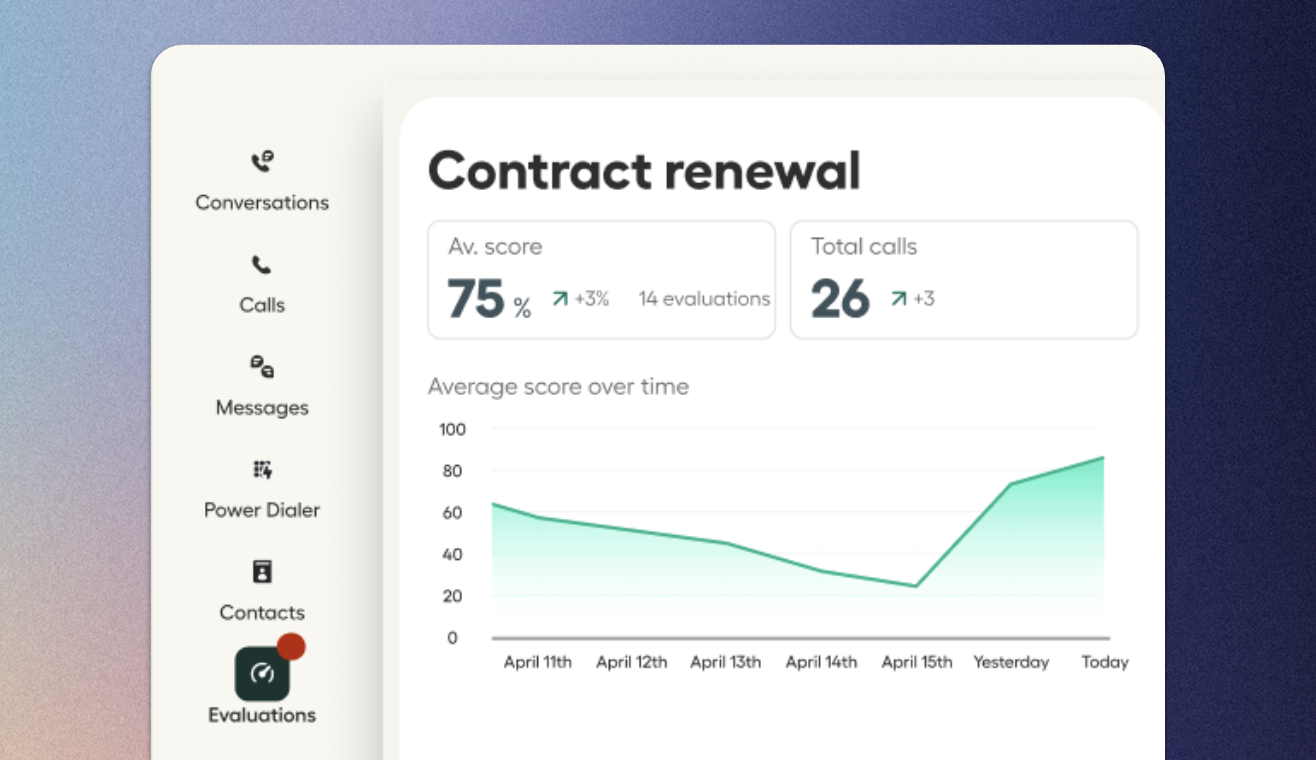
AI call scoring evaluates each call against a configured scoring framework and delivers feedback to help reps improve their sales performance. With reps having access to their call scoring, they now see their own evaluation scorecards directly after each call, so coaching insights arrive without waiting for a manager debrief.
Until now, evaluation scorecards were visible to managers only. Reps only found out during a debrief, if a manager had time to schedule one.
This new functionality changes how the feedback loop works. Reps can see their own AI evaluation scorecards directly in Aircall, as soon as the call is scored. They don't wait for a manager to surface the feedback. They see how the call was evaluated, reflect on it, and can bring that into their next conversation.
The 1:1 changes too. When reps already know their scorecard, the conversation shifts from "here's what happened" to "what are we doing about it?"
99.6% scoring accuracy: The scorecard replaces the replay
Scores that reflect what actually happened on the call. Coaching feedback that reads like a manager wrote it. Both depend on the underlying model and this release upgrades it.
Aircall continuously adopts the best available AI models so customers benefit from improvements in conversation intelligence without any configuration changes. The benchmarking results from the latest upgrade to GPT-5 mini:
Scoring accuracy: 96% → 99.6%
Coaching tone (does feedback read like a coach, not a dry report): 28% → 60%
Correctness (does the response accurately reflect the transcript): 94% → 99%
Undergeneration (AI says "not discussed" when it was): 2.8% → 0.4%
Sentiment analysis received the same upgrade. It’s now better at distinguishing complaints about third parties from complaints about the rep, and more reliable at reading emotional tone across longer calls.
No configuration required. Every AI Assist customer gets more accurate outputs, automatically.
Handle sensitive data before it's ever stored
Transcription Redaction automatically removes sensitive information from call transcriptions before storage. Three categories: Payment Data (PCI), Personal Information (PII), and Medical Information (PHI). Configurable at the company level or per number.
For teams in financial services, healthcare, legal, or any customer-facing role that handles personal information, this removes a key barrier to AI Assist adoption. Redaction happens before data is stored, so sensitive content never enters the transcript in the first place.
One important note: redaction removes the data storage concern but doesn’t make Aircall PCI-, GDPR-, or HIPAA-compliant on its own. See Aircall's security and compliance documentation for full details.
Available to all AI Assist and AI Assist Pro customers.
All of this, already in Aircall
Reps see their own scorecards after every call. Tags are suggested automatically. AI outputs reflect your business, from Company Context to a model upgrade that pushes scoring accuracy to 99.6%.
Everything in this release lives inside your existing Aircall workspace.
P.S. Ask AI Assist is now open in Beta. We introduced it in our last release. If you've already signed up to the waitlist, check out your dashboard.
Published on April 15, 2026.
