

Ready to build better conversations?
Simple to set up. Easy to use. Powerful integrations.
Get free accessReady to build better conversations?
Simple to set up. Easy to use. Powerful integrations.
Get free accessThere's a pattern buried in most outbound operations, and it plays out before anyone speaks. The rep dials. The contact's phone rings. And the number the prospect sees doesn’t seem familiar so they let it go to voicemail.
Outbound teams are spending hours on the phone every day. Unfamiliar caller IDs are quietly deciding how many of those calls actually get answered.
Manual number switching slows everyone down.
Some teams try to fix it by telling reps to select the right local number before each dial. In theory, that works. In practice, it requires every rep to know which number to pick, to open the dropdown before each call, and to do that consistently across hundreds of dials a day.
They don't. And when they're running Power Dialer sessions at volume, there's no opportunity to even try. This automation will be naturally available in our new outbound campaigns feature coming soon.
The result is that whether a contact sees a recognizable local caller ID depends almost entirely on whether the rep remembered to switch, how many local numbers are in the pool, and whether anyone set up the assignment correctly in the first place. That's not a system. That's a hope.
The pickup rate impact is real. Contacts are more likely to answer a number that matches their area code or looks like it's from their region, especially on warm outbound, where the prospect has had prior contact or shown intent. Local Presence is at its most effective in exactly that context: teams calling leads who know the company, following up on trials, or re-engaging existing customers. For cold outbound at high volume with low engagement rates, the match helps but it's not a substitute for the right list and the right approach.
What Local Presence does and how it works
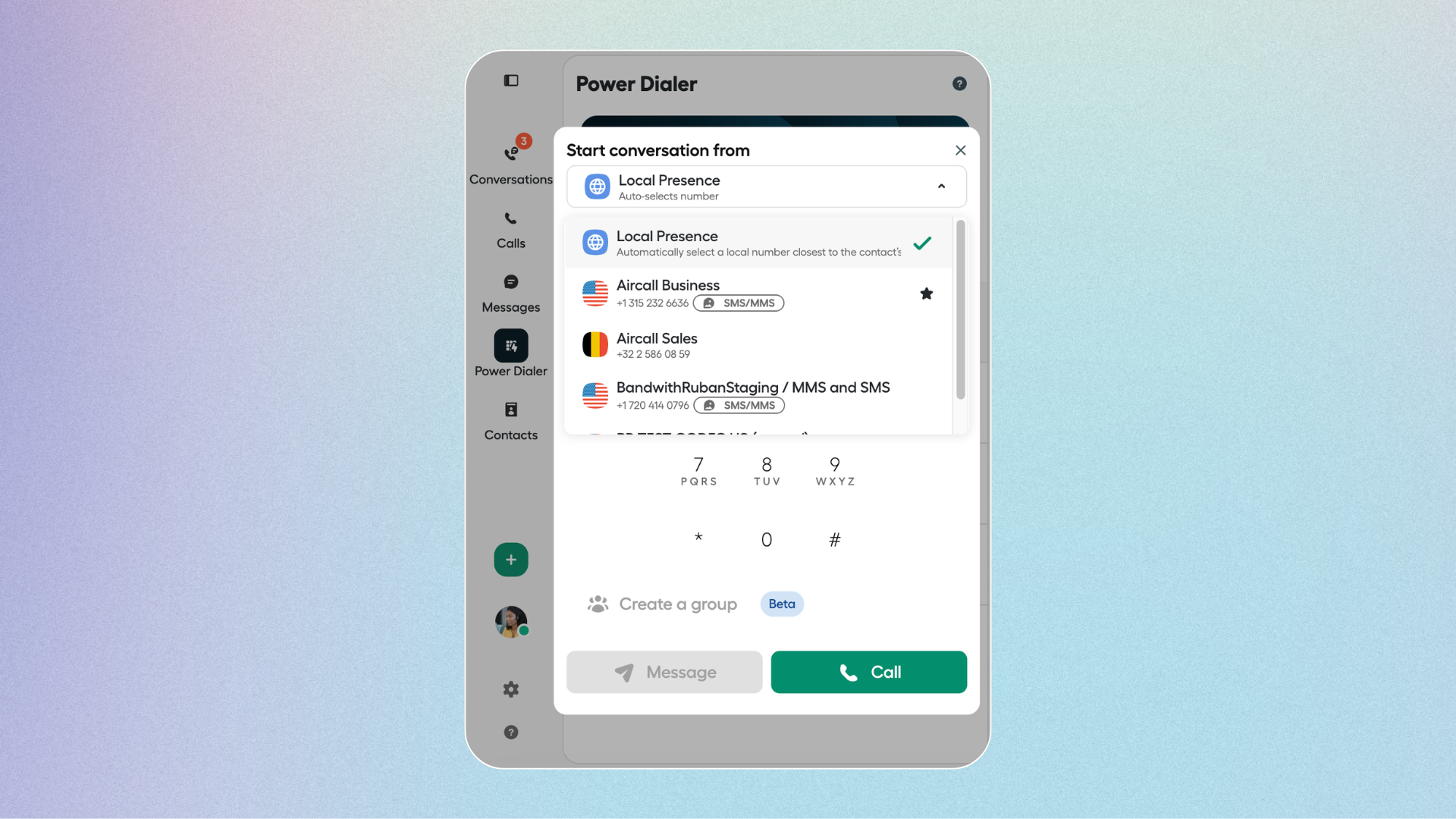
Local Presence, now generally available in Aircall for Pro plan customers, handles the matching automatically. Every time a rep initiates an outbound call, Aircall reads the destination number and selects the best available number from that rep's assigned pool. No dropdown. No manual selection. The right number goes out.
The matching logic runs in priority order: same area code as the recipient first, then same state or region, then same country, then the rep's default number as a fallback. When multiple numbers match at the same level, Aircall rotates between them, distributing call volume across the full pool to reduce overuse and protect number reputation over time.
No new numbers are provisioned automatically. The more local numbers already assigned to a rep, the stronger their regional coverage.
The more local numbers already assigned to a rep, the stronger their regional coverage. Please note that no new numbers are provisioned automatically.
Where the match lands hardest
In the US and Canada, both landlines and mobiles use the same area code format which means Local Presence matches at city level for every outbound call. That's the market where pickup rate improvement is most direct, and where the absence of a local presence is most likely to cost deals.
In the UK, Germany, Austria, and Switzerland, city-level matching applies to landlines. In France, Spain, Italy, Australia, and LATAM, matching is at region level.
For multinational teams, the headline is simpler: every call goes out from a same-country number automatically, with no per-country configuration required.
What this means for how ops teams run outbound
For RevOps and Sales Ops, two operational gains stand out.
Rep time stays on conversations. Number selection becomes invisible. Reps dial; the system handles the rest. In Power Dialer sessions, Local Presence applies to every call in the session from a single configuration at the start.
Procure additional numbers, if required. Local Presence works from the numbers already in your inventory. If coverage in a specific region matters more, buying additional local numbers for that region improves matching but nothing needs to change for the feature to work today.
Setup: one admin toggle
There's no migration, no reconfiguration, no new infrastructure. Local Presence is enabled automatically, you can find it in your Aircall Dashboard → Users & Teams → select a user → Call Preferences → toggle Local Presence on.
The rep selects "Local Presence" in the From field of the Start a conversation workflow, and the setting persists. For Power Dialer sessions, the same selection applies across the full run. Click-to-dial from your CRM fires automatically, no separate setup needed.
Local Presence is included in the Pro plan at no additional cost.
Voice only, does not apply to SMS, MMS, or WhatsApp.
Try it today
If your team is on Pro, Local Presence is already available. For teams not yet on Pro, talk to your Aircall account manager about what an upgrade unlocks.
Published on June 11, 2026.
